Changelog
Improvements, fixes, and new capabilities—released as they’re ready.
Improvements, fixes, and new capabilities—released as they’re ready.
Improvements, fixes, and new capabilities—released as they’re ready.
Ideas or feedback? Contact support@carbongraph.io.
Ideas or feedback? Contact support@carbongraph.io.
Ideas or feedback? Contact support@carbongraph.io.
October 14, 2026
2026.10.14.p01
Classification breakdown bug fix, plus UI/UX improvements
Classification breakdowns now split shared inputs correctly. If one dataset feeds several differently classified cards through an intermediate card, its impact is divided between those classifications in proportion to the flow each one uses. Before, all of it went to a single classification. This release also includes small UI improvements and several fixes.
What changed
Classification breakdowns
A shared input that reaches several classifications through untagged intermediate cards is now split in proportion to the flow each classification consumes. Previously, a bug caused the whole impact to go to whichever connection came first.
The fix applies to every classification family: GHG categories, EPD modules, lifecycle stages and emission scopes.
Model totals and the dataset and card breakdowns don't change.

An acrylonitrile-butadiene-styrene (ABS) dataset feeds an untagged intermediary card, which splits the flow evenly between a card tagged A1 and a card tagged A2. The EPD Module breakdown now splits the 6.55 kg CO2-Eq to match: 3.28 to A1 and 3.28 to A2 (50% each). Before this fix, all 6.55 kg CO2-Eq went to either A1 or A2, depending on which connection came first.
Other improvements and fixes
Small UI/UX improvements across the graph editor, including window and pop-out behaviour, menu and scrollbar fit, card amount display, unit names in the unit picker, and sidebar icons.
Closing Manage Parameters with an invalid expression now warns you instead of discarding the edit.
Duplicating a process with an ecoinvent-derived product flow now works.
The CarbonGraph Agent reliably sees dataset-backed processes and keeps your previous chats listed.
US gallon units now use the exact conversion factor (0.0037854 m³).
How it works
Breakdowns follow each path from a card to your reference product. Every share goes to the first classified card on its path. A share that reaches no classified card is reported as Uncategorized.
The split doesn't depend on the order of connections, and each scenario in Scenario Analysis uses its own flow split.
Why it matters
GHG-category and EPD-module breakdowns can be trusted again for models that route shared transport or utilities through a single intermediate card. The workaround of connecting each dataset directly to every consumer is no longer needed.
Parameter edits are no longer lost without warning.
Availability
Available now to all users. No setting to turn on.
Breakdowns are calculated when you request them, so affected models show the corrected split the next time you calculate.
If your model routes a shared input through an untagged intermediate card, recheck any classification breakdowns you exported or reported since June 2026. Totals were always correct; only the split between classifications changes.
Existing exchanges in US gallons keep their previous factor so past results don't shift. New exchanges use the corrected one.
October 14, 2026
2026.10.14.p01
Classification breakdown bug fix, plus UI/UX improvements
Classification breakdowns now split shared inputs correctly. If one dataset feeds several differently classified cards through an intermediate card, its impact is divided between those classifications in proportion to the flow each one uses. Before, all of it went to a single classification. This release also includes small UI improvements and several fixes.
What changed
Classification breakdowns
A shared input that reaches several classifications through untagged intermediate cards is now split in proportion to the flow each classification consumes. Previously, a bug caused the whole impact to go to whichever connection came first.
The fix applies to every classification family: GHG categories, EPD modules, lifecycle stages and emission scopes.
Model totals and the dataset and card breakdowns don't change.
An acrylonitrile-butadiene-styrene (ABS) dataset feeds an untagged intermediary card, which splits the flow evenly between a card tagged A1 and a card tagged A2. The EPD Module breakdown now splits the 6.55 kg CO2-Eq to match: 3.28 to A1 and 3.28 to A2 (50% each). Before this fix, all 6.55 kg CO2-Eq went to either A1 or A2, depending on which connection came first.
Other improvements and fixes
Small UI/UX improvements across the graph editor, including window and pop-out behaviour, menu and scrollbar fit, card amount display, unit names in the unit picker, and sidebar icons.
Closing Manage Parameters with an invalid expression now warns you instead of discarding the edit.
Duplicating a process with an ecoinvent-derived product flow now works.
The CarbonGraph Agent reliably sees dataset-backed processes and keeps your previous chats listed.
US gallon units now use the exact conversion factor (0.0037854 m³).
How it works
Breakdowns follow each path from a card to your reference product. Every share goes to the first classified card on its path. A share that reaches no classified card is reported as Uncategorized.
The split doesn't depend on the order of connections, and each scenario in Scenario Analysis uses its own flow split.
Why it matters
GHG-category and EPD-module breakdowns can be trusted again for models that route shared transport or utilities through a single intermediate card. The workaround of connecting each dataset directly to every consumer is no longer needed.
Parameter edits are no longer lost without warning.
Availability
Available now to all users. No setting to turn on.
Breakdowns are calculated when you request them, so affected models show the corrected split the next time you calculate.
If your model routes a shared input through an untagged intermediate card, recheck any classification breakdowns you exported or reported since June 2026. Totals were always correct; only the split between classifications changes.
Existing exchanges in US gallons keep their previous factor so past results don't shift. New exchanges use the corrected one.
September 18, 2026
2026.09.16.p01
Introducing Model Variants
You can now manage multiple named product or facility configurations within a single CarbonGraph model.
Each model retains a shared Baseline, while individual Variants store only the parameter values that differ. This helps teams avoid model duplication and maintain one consistent methodology across related products, facilities, and reporting configurations.
With Model Variants, you can:
Create, copy, rename, and manage named Variants.
Edit individual overrides or work across multiple Variants.
Calculate and review Variant-specific results in the model and dashboard.
Start scenario and uncertainty analyses from a selected Variant.
Export results for a particular version and Variant.
Select committed Variants in linked model systems.
Preserve Variants when committing new model versions.
Variants are persistent configurations intended for reuse and versioning. Scenarios remain temporary “what if?” analyses that build upon the selected Baseline or Variant.
September 18, 2026
2026.09.16.p01
Introducing Model Variants
You can now manage multiple named product or facility configurations within a single CarbonGraph model.
Each model retains a shared Baseline, while individual Variants store only the parameter values that differ. This helps teams avoid model duplication and maintain one consistent methodology across related products, facilities, and reporting configurations.
With Model Variants, you can:
Create, copy, rename, and manage named Variants.
Edit individual overrides or work across multiple Variants.
Calculate and review Variant-specific results in the model and dashboard.
Start scenario and uncertainty analyses from a selected Variant.
Export results for a particular version and Variant.
Select committed Variants in linked model systems.
Preserve Variants when committing new model versions.
Variants are persistent configurations intended for reuse and versioning. Scenarios remain temporary “what if?” analyses that build upon the selected Baseline or Variant.
August 7, 2026
2026.08.07.p01
Redesigned account page and model editor
Your account page and model editing view have a new look and layout — the first visible step toward organizing CarbonGraph around outcomes, not just models. You can read more about where that broader direction is headed in Rethinking the CarbonGraph journey: from models to outcomes.
What changed
Redesigned account page layout and navigation
Redesigned model editing view
No change to how existing models, data, or calculations work — this is a visual and structural update to these two areas only
How it works
Everything available before in account settings and the model editor is still there
What's changed is the organization and presentation, not the underlying functionality
No action needed — existing models and settings carry over as-is
Why it matters
Lays the groundwork for a shift from a single model-centric view toward a workspace organized around outcomes (e.g., producing an EPD, a product carbon footprint)
That broader direction is still an active design exploration we're gathering feedback on — nothing beyond today's account and model editor update is live yet
Availability
Live now for all CarbonGraph users
No plan restrictions
No known limitations
August 7, 2026
2026.08.07.p01
Redesigned account page and model editor
Your account page and model editing view have a new look and layout — the first visible step toward organizing CarbonGraph around outcomes, not just models. You can read more about where that broader direction is headed in Rethinking the CarbonGraph journey: from models to outcomes.
What changed
Redesigned account page layout and navigation
Redesigned model editing view
No change to how existing models, data, or calculations work — this is a visual and structural update to these two areas only
How it works
Everything available before in account settings and the model editor is still there
What's changed is the organization and presentation, not the underlying functionality
No action needed — existing models and settings carry over as-is
Why it matters
Lays the groundwork for a shift from a single model-centric view toward a workspace organized around outcomes (e.g., producing an EPD, a product carbon footprint)
That broader direction is still an active design exploration we're gathering feedback on — nothing beyond today's account and model editor update is live yet
Availability
Live now for all CarbonGraph users
No plan restrictions
No known limitations
July 28, 2026
2026.07.28.p01
Export and analyze Product Flow Inventories
CarbonGraph can now generate a Product Flow Inventory showing the product flows associated with each process, scaled to the model’s functional or declared unit. This reduces the manual spreadsheet work required to prepare foreground inventory tables for LCA reports and EPDs.
What changed
Export a Product Flow Inventory as part of a custom Excel export.
Choose between a summarized Root model only view and an itemized Full system view.
Follow processes through the linked-model hierarchy, including separate instances when the same linked model is used multiple times.
Review product-flow names, identifiers, types, units, scaling factors, and signed amounts directly in the workbook.
Use the AI agent to investigate product-flow totals, contributing processes, linked-model instances, and the source of inventory results.
See clearer export terminology: LCI Results is now labelled Elementary Flow Inventory, while the new foreground export is labelled Product Flow Inventory.
How it works
From the Excel export dialog, select Product Flow Inventory. Use Root model only for a concise view in which linked models are represented by summarized model rows. Use Full system to itemize the processes within linked models and see how the complete hierarchy contributes to the inventory.
Values are scaled to the exported functional or declared unit. Positive values represent process inputs, while negative values represent outputs.
The AI agent uses the same path-aware inventory data, allowing users to ask which processes contribute to a product flow, compare repeated linked-model instances, or trace a result through the model hierarchy.
Why it matters
Producing foreground inventory tables for LCA reports and EPDs previously required significant manual extraction and spreadsheet manipulation. The new export makes this data directly available from the calculated model, saving time and reducing the risk of transcription, scaling, and attribution errors.
Availability
The Product Flow Inventory export and AI agent integration will become available automatically following deployment. Existing models do not require any changes.
July 28, 2026
2026.07.28.p01
Export and analyze Product Flow Inventories
CarbonGraph can now generate a Product Flow Inventory showing the product flows associated with each process, scaled to the model’s functional or declared unit. This reduces the manual spreadsheet work required to prepare foreground inventory tables for LCA reports and EPDs.
What changed
Export a Product Flow Inventory as part of a custom Excel export.
Choose between a summarized Root model only view and an itemized Full system view.
Follow processes through the linked-model hierarchy, including separate instances when the same linked model is used multiple times.
Review product-flow names, identifiers, types, units, scaling factors, and signed amounts directly in the workbook.
Use the AI agent to investigate product-flow totals, contributing processes, linked-model instances, and the source of inventory results.
See clearer export terminology: LCI Results is now labelled Elementary Flow Inventory, while the new foreground export is labelled Product Flow Inventory.
How it works
From the Excel export dialog, select Product Flow Inventory. Use Root model only for a concise view in which linked models are represented by summarized model rows. Use Full system to itemize the processes within linked models and see how the complete hierarchy contributes to the inventory.
Values are scaled to the exported functional or declared unit. Positive values represent process inputs, while negative values represent outputs.
The AI agent uses the same path-aware inventory data, allowing users to ask which processes contribute to a product flow, compare repeated linked-model instances, or trace a result through the model hierarchy.
Why it matters
Producing foreground inventory tables for LCA reports and EPDs previously required significant manual extraction and spreadsheet manipulation. The new export makes this data directly available from the calculated model, saving time and reducing the risk of transcription, scaling, and attribution errors.
Availability
The Product Flow Inventory export and AI agent integration will become available automatically following deployment. Existing models do not require any changes.
July 13, 2026
2026.04.06.p01
Clearer support information for EN 15804 impacts
Summary
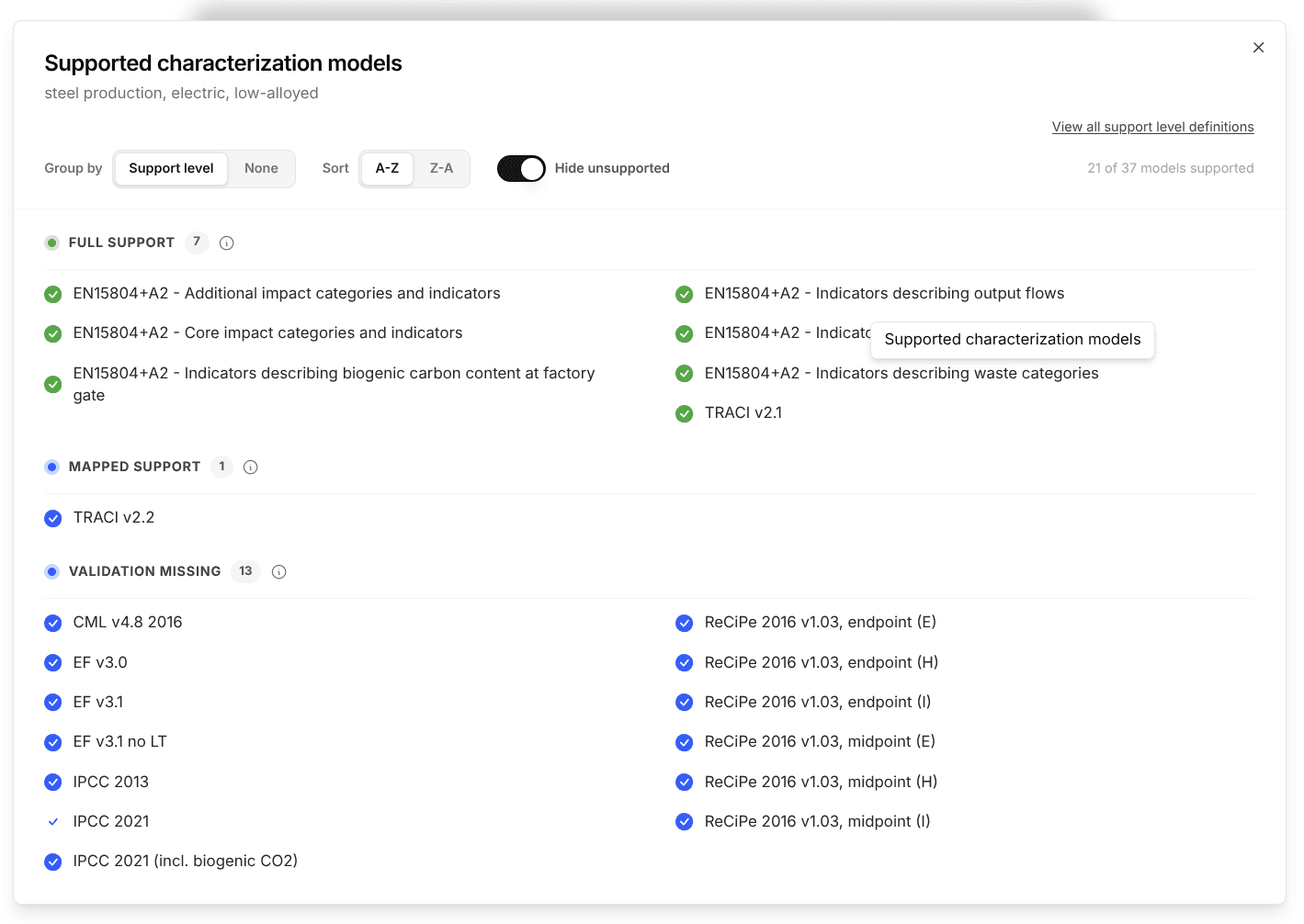
CarbonGraph now provides clearer support information for the Ecoinvent 3.11 Allocation Cut-off EN15804 dataset. Impacts that are available for use but do not have formal validation files are now identified as Validation missing instead of Unsupported.
What changed
Added a Validation missing status for affected EN 15804 impacts.
Updated support indicators and descriptions throughout CarbonGraph.
Ensured these impacts remain available in relevant modeling and reporting workflows.
Retained the Unsupported status for impacts that cannot be used.
How it works
When selecting characterization models and reviewing supported impacts, users may now see Validation missing. This means the impact can be calculated normally, but formal validation files have not been published for it.
The underlying impact values and calculations have not changed.
Why it matters
The previous Unsupported label could suggest that these impacts were unavailable or unsuitable for use. The new status gives practitioners a clearer picture of what is available while remaining transparent about the missing validation information.
Availability
This update is rolling out to CarbonGraph customers with access to the Ecoinvent 3.11 Allocation Cut-off EN15804 dataset. The updated support information will appear automatically as the rollout reaches each workspace; no action is required from users.
July 13, 2026
2026.04.06.p01
Clearer support information for EN 15804 impacts
Summary
CarbonGraph now provides clearer support information for the Ecoinvent 3.11 Allocation Cut-off EN15804 dataset. Impacts that are available for use but do not have formal validation files are now identified as Validation missing instead of Unsupported.
What changed
Added a Validation missing status for affected EN 15804 impacts.
Updated support indicators and descriptions throughout CarbonGraph.
Ensured these impacts remain available in relevant modeling and reporting workflows.
Retained the Unsupported status for impacts that cannot be used.
How it works
When selecting characterization models and reviewing supported impacts, users may now see Validation missing. This means the impact can be calculated normally, but formal validation files have not been published for it.
The underlying impact values and calculations have not changed.
Why it matters
The previous Unsupported label could suggest that these impacts were unavailable or unsuitable for use. The new status gives practitioners a clearer picture of what is available while remaining transparent about the missing validation information.
Availability
This update is rolling out to CarbonGraph customers with access to the Ecoinvent 3.11 Allocation Cut-off EN15804 dataset. The updated support information will appear automatically as the rollout reaches each workspace; no action is required from users.
April 17, 2026
2026.04.06.p01
Folders Replace Collections for Model Organization
Models can now be organized using a nested folder structure, replacing the previous collections system — a more natural fit for how teams build models and manage their work.
What's changed
Collections have been replaced by folders
Each model now belongs to a single folder, rather than multiple collections
Folders can be nested to create a hierarchy that matches how your team works, and how nested models are built
Existing models have been migrated to the new structure
What's now possible
Build a folder hierarchy that reflects how your team organizes its work, and how nested models are built
Navigate and manage models more intuitively
Lays the groundwork for easier model sharing and collaboration, coming in future releases
April 17, 2026
2026.04.06.p01
Folders Replace Collections for Model Organization
Models can now be organized using a nested folder structure, replacing the previous collections system — a more natural fit for how teams build models and manage their work.
What's changed
Collections have been replaced by folders
Each model now belongs to a single folder, rather than multiple collections
Folders can be nested to create a hierarchy that matches how your team works, and how nested models are built
Existing models have been migrated to the new structure
What's now possible
Build a folder hierarchy that reflects how your team organizes its work, and how nested models are built
Navigate and manage models more intuitively
Lays the groundwork for easier model sharing and collaboration, coming in future releases
April 16, 2026
2026.04.06.p01
Multi-Output & Upstream Allocation Support
Model processes with multiple outputs and define how impacts are distributed across them — enabling more accurate representation of co-products and complex systems.
What’s improved
Define multiple outputs directly on a process
Choose which output to calculate against when analyzing results
Set allocation at the process level using parameters and expressions
Built-in guardrails ensure allocation sums to 100%
Upstream allocation handled automatically (no additional setup required)
Existing single-output models continue to behave as before
What’s now possible
Model co-products and shared production systems more flexibly
Explore allocation scenarios by adjusting parameters and expressions
Analyze results from different output perspectives within the same model
Better alignment with real-world datasets and more complex LCA workflows
April 16, 2026
2026.04.06.p01
Multi-Output & Upstream Allocation Support
Model processes with multiple outputs and define how impacts are distributed across them — enabling more accurate representation of co-products and complex systems.
What’s improved
Define multiple outputs directly on a process
Choose which output to calculate against when analyzing results
Set allocation at the process level using parameters and expressions
Built-in guardrails ensure allocation sums to 100%
Upstream allocation handled automatically (no additional setup required)
Existing single-output models continue to behave as before
What’s now possible
Model co-products and shared production systems more flexibly
Explore allocation scenarios by adjusting parameters and expressions
Analyze results from different output perspectives within the same model
Better alignment with real-world datasets and more complex LCA workflows
February 10, 2026
2026.02.10.p01
Drawers UI — Work without losing context
Interacting with your model now happens in side panels instead of blocking popups, so you can keep your model visible while you work.
What’s improved
Edit parameters alongside your model
Resize panels to fit your workspace
Minimize Scenario Analysis and Uncertainty Analysis when you want more modeling space
Smoother search, sorting, bulk edits, and reordering
Consistent side panel experience across Parameters, AI Agent, Search, and Analysis
Clear visual cues when panels are open
Cleaner layouts and improved responsiveness throughout
What's Now Possible
Less context switching, fewer interruptions, and a faster, more fluid modeling workflow — especially for larger or more complex models.
February 10, 2026
2026.02.10.p01
Drawers UI — Work without losing context
Interacting with your model now happens in side panels instead of blocking popups, so you can keep your model visible while you work.
What’s improved
Edit parameters alongside your model
Resize panels to fit your workspace
Minimize Scenario Analysis and Uncertainty Analysis when you want more modeling space
Smoother search, sorting, bulk edits, and reordering
Consistent side panel experience across Parameters, AI Agent, Search, and Analysis
Clear visual cues when panels are open
Cleaner layouts and improved responsiveness throughout
What's Now Possible
Less context switching, fewer interruptions, and a faster, more fluid modeling workflow — especially for larger or more complex models.
January 30, 2026
2025.01.30.p01
Monte Carlo & Uncertainty Analysis
CarbonGraph now supports full Monte Carlo simulation to quantify and report uncertainty in LCA and EPD results. Read more in the blog.
What's Improved
Parameter-level probability distributions:
Fixed, Normal, Lognormal (μ/σ), Lognormal (Median/GSD), Uniform, Triangular, Beta, Gamma
Configurable iterations and random seed for reproducible runs
Default uncertainty handling for unparameterized exchanges
Full re-evaluation of all impact methods per iteration (TRACI, EF, CML, etc.)
Results reporting:
Percentiles (e.g., P5/P50/P95)
Box plots
Violin plots
Histograms
Tables
What's Now Possible
Reporting statistical ranges alongside impact results
Sensitivity analysis
Defensible uncertainty documentation for verification
More rigorous EPD submissions
Scientific-grade LCA workflows
Available now in Uncertainty Analysis for any model or flowsheet.
January 30, 2026
2025.01.30.p01
Monte Carlo & Uncertainty Analysis
CarbonGraph now supports full Monte Carlo simulation to quantify and report uncertainty in LCA and EPD results. Read more in the blog.
What's Improved
Parameter-level probability distributions:
Fixed, Normal, Lognormal (μ/σ), Lognormal (Median/GSD), Uniform, Triangular, Beta, Gamma
Configurable iterations and random seed for reproducible runs
Default uncertainty handling for unparameterized exchanges
Full re-evaluation of all impact methods per iteration (TRACI, EF, CML, etc.)
Results reporting:
Percentiles (e.g., P5/P50/P95)
Box plots
Violin plots
Histograms
Tables
What's Now Possible
Reporting statistical ranges alongside impact results
Sensitivity analysis
Defensible uncertainty documentation for verification
More rigorous EPD submissions
Scientific-grade LCA workflows
Available now in Uncertainty Analysis for any model or flowsheet.
December 15, 2025
2025.12.15.p01
EPD Exports
Features
Added support for exporting model results broken out by EPD category.
Improvements
Optimized scenario analysis to run faster.
Made several UI improvements across the platform.
December 15, 2025
2025.12.15.p01
EPD Exports
Features
Added support for exporting model results broken out by EPD category.
Improvements
Optimized scenario analysis to run faster.
Made several UI improvements across the platform.
November 27, 2025
2025.11.27.p03
TRACI 2.2 Support
Features
Added TRACI 2.2 impact method support for ecoinvent and select LCI datasets.
Added EF 3.1 impact method support for USLCI datasets.
November 27, 2025
2025.11.27.p03
TRACI 2.2 Support
Features
Added TRACI 2.2 impact method support for ecoinvent and select LCI datasets.
Added EF 3.1 impact method support for USLCI datasets.